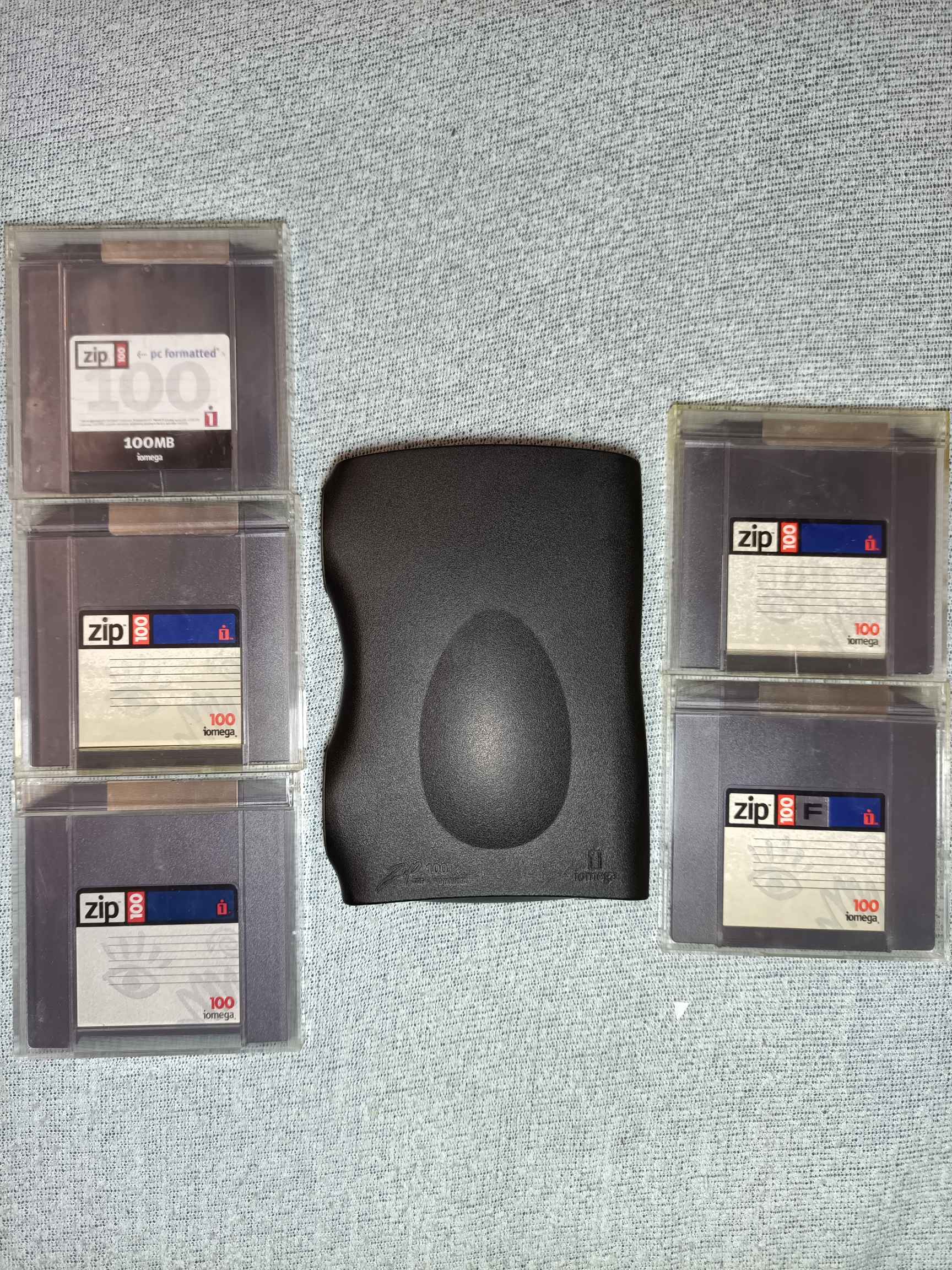
So, I got this. But I also know these things aren’t the most reliable and I am really paranoid about breaking it, and there’s some suspicious things.
First, it feels cheap, especially the USB port on the back feels like it wants to break off.
Second, and quite worrying, when I first got it, it was clicking and not reading disks. Slower when I held it with the opening towards the top, faster with opening towards bottom. I thought it was dead, when eventually after a few retries it started working. Now, this was faster clicking, especially fast shortly before it started working, so perhaps it was just stuck.
On the other hand, I found this: https://www.grc.com/tip/codfaq2.htm
Most users who have lost their crucial data tell the same sad story of hearing “those clicks” some time ago “but then they went away and everything seemed okay for a while.”
Now, 2 of the disks also had some smaller issues. One had trouble loading. Formatting it seems to have fixed the issue. Maybe. I used fdisk so it left out the first 1MB.
The second loads fine, but doesn’t seem to like writing. It seems to do it in bursts, and it is audible. There’s also 2 sections where it produces a buzz, both on read and write.
Here’s an audio sample from continuous (one file) write to that disk:
https://files.catbox.moe/yo6g50.flac
Current ideas
Checking disks for damages by pulling back the metal cover and rotating the disk manually, looking for stuff like this: https://www.grc.com/tip/codfaq4.htm or anything suspicious (the white cloth inside is too close and hairy for my liking).
Peeking into the drive to check for head damage and dirt.
Treating it like I treat running HDDs (do not unpower without parked heads, avoiding movement and vibrations), and generally being careful even when off (avoiding drops).
It’s a simple test really. Have you ever considered thinking about having a inclination to plug the drive in? Well it’s probably broke now.
In all seriousness, I used Zip and Jazz drives professionally back in the early '00s. And gods above and below we lost so many hours of work to them just crapping out. We used them for system imaging. We were building out bespoke servers and workstations for physical access control systems. We stored golden images on zip discs and would image completed systems to send to the customers along with their systems. We created those images on other zip discs before taking them to the one system with a cd/dvd burner. We chewed through so many zip discs it was crazy.
I finally setup the dvd burning station on a cart so it could be wheeled over to customer systems. It provided a PXE server to boot from and images to both load the golden image over a network switch and image the competed systems. The savings in time and dead zip discs was huge.
I get playing with those things for nostalgia. But the only thing they could be relied upon to do was die.
Wow, who ever though zip was a good idea for this? Lol. Well, you gained a lot of experience.
We were using cd’s in the mid/late 90’s for imaging already.
in the late 90s/early 00s I went through a few of these drives. OP, they break, they just die. once you start getting the “clicks of death” it’s only a matter of time before the entire drive craps out on you. it generally doesn’t happen all at once. few clicks here and there. but eventually it’ll become more frequent until every zip disk you pop in just starts clicking. Just how it goes. and the thing is they’re pretty much impossible to fix. when it’s dead, it’s dead.
All I can suggest is enjoy it while you can because it WILL die and the fact the thing has lasted this long is impressive.
Eventually after the 4th drive died my Dad was done with them, had enough. Spent the money to get a CD-RW drive.
So they’re great for nostalgia. they’re neat in that regard. but don’t put anything you would consider even moderately important on those zip disks.
I wish I could see into the drive when it was clicking to see what exactly was happening, whether it was seek issue, or the head arm was just stuck (and not even entering the disk). It should have been functional before shipping. And also, I let it warm up for an hour, but there was some condensation after bringing it in on it, and I don’t know how it was doing inside, though I think it should have been okay after that much time on table.
But I guess you could also say these are always in the state of dying, and were since their manufacture. Welp, fingers crossed, all I can do.
Anyway, as for the problematic disk, Iomegaware’s full format manages to take care of it, but it’s far slower than writing the whole disk.
Long Format performs a complete surface verify on the disk as it is formatted. This option should be used for all disks that have developed read/write errors.
It also shows disk and “formatting” life percentage, whatever those actually mean. I couldn’t get Trouble in Paradise to work in either Windows XP or 2000, though I didn’t try on bare metal.
There was a day in 2003 when literally everyone who had touched a computer applauded without knowing why.
It was the day Iomega stopped producing zip drives because they were finally obsolete.
When I first asked for a CD writer, my dad bought a zip drive instead because they were cheaper.
They were not equivalent.
Idk OP that sounds like your’s might be on the way to suffer the same fate as the other users you read up on. I dont know too much about zip drives but if your’s is exhibiting behavior that others reported were death throws I’d do what you wanted to do with it quickly before it kicks it. Ducking “zip drive clicks” only makes this more foreboding.
*throes
Or I’ll just… more bad financial decisions incoming - buy another one. Though I don’t know how much it’s worth. I got this one with the disks for €22. There’s one more (functional) USB ZIP drive with 3 disks, an older one which also needs external power (and is transparent), but it’s already at €35 and there’s 19 people watching the auction, so… Probably because it’s also with the original box and Iomegaware CDs.
Really, I just wanted a functional ZIP drive just to have one. Honestly, if it was cheap, I’d just bring it with me and use it instead of a flash drive just for fun. That would get some stares. And 100MB is still pretty fine for documents (that are backed up).
Through the power of buying two …
If you want a novel but obsolete portable storage format, you could check out MiniDiscs. You’d need a working recorder that supports Hi-MD for data storage.
I believe them to be more reliable than Zip discs, though I no data to back that. But still, it’s 20+ year old equipment with mechanical components, so equipment failure is just a matter of time.
Working recorders can also be a bit pricey.
One I wish I could get is SuperDisk LS-240. It came some time later, so it wasn’t quite popular, but the later LS-240 drives had one very cool trick. They could re-format 1.44MB floppies to FD32MB format as they called it, bringing them to 32MB through the use of SMR. Of course, they couldn’t then be used in regular floppy drives again, but damn, 32MB on a regular 3.5" floppy.
Zip drives are known for the “Click of death” sound. If you hear it, it’s dead. You could probably google that term.
Well, yeah. That’s the one I fear.
But there seems to be 2 ways it can happen.
- Non catastrophic - misaligned write destroying factory low level formatting
- Ripped off drive heads
And I also found one blog post where it was caused by the 4 plastic prongs getting bent due to a stiff shutter on one of the disks, which was fixable by bending those back: https://www.siber-sonic.com/mac/Zip250fix.html
I know about the click of death, I’ve experienced the click of death, but does someone know exactly what it is and how it happens?